Inspecting, routing and protecting routes
Tools on each route's page in the dashboard. A route that doesn't use them works exactly as before.
Requests: see what arrives
Record on a route's page records its requests for 5, 15 or 60 minutes, then stops by itself. Each request shows:
- what was sent: the full URL, ready to copy, with its query parameters (values of credentials such as
access_token,api_key,codeorsigare masked), headers (credentials such asAuthorization, cookies, tokens and API keys are masked), cookie names, client IP and user agent. Bodies are never recorded. - what Smart Proxy did with it: answered by the application, woke it up first, showed the waking page, answered for it while asleep (an ignored monitor), refused it (no login), or couldn't reach it; which backend got it and why.
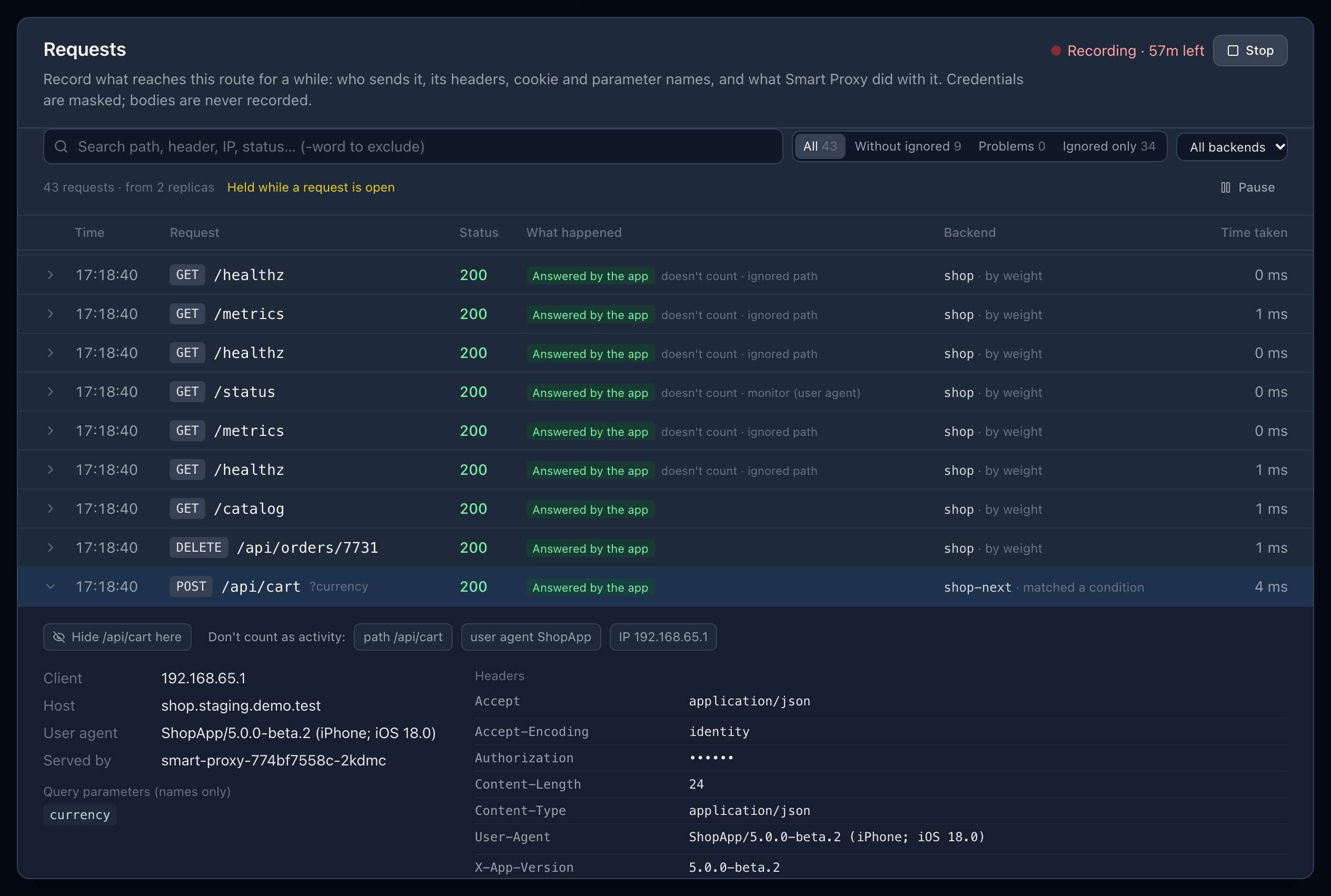
Every replica records the requests it serves; the dashboard gathers them, whichever replica it talks to. Recordings are kept in memory (the latest 300 per route and replica).
Finding your way in the list:
- Search with words: all must match (path, header, IP, status…); a word starting with
-hides the requests containing it, e.g.-/health. - Quick views: all requests, without ignored (monitors and health checks hidden), problems (errors, refused requests, requests the app couldn't answer), ignored only; and one backend when the route has several.
- The list holds still while a request is open: new requests are counted (3 new requests) and shown when you ask, so the request you are reading doesn't move away. Pause does the same without opening one.
From a recorded request:
- Route like this… next to a header turns it into a backend condition;
- Hide … here hides the requests to that path from the list;
- Don't count as activity adds an ignore rule for its path, user agent or IP.
Backends: send some requests elsewhere
A route can have more than one backend, each a Service of its namespace. Add a backend on the route's page.
- Conditions send matching requests to a backend, whatever the weights: a header, cookie or query parameter that is, contains, starts with a value or is present; a path; a client IP or CIDR. Any of a backend's conditions is enough; the first backend with a matching condition wins.
- Weights share the other requests among the backends that are running. A backend with weight
0gets only the requests matching its conditions. - The browser stays on the backend it was sent to (cookie), so a login or session started there continues there. Over HTTPS the cookie is
SameSite=None, so it also comes with cross-site form posts, such as a payment or sign-in page posting back. - Managed backends are woken by the requests sent to them and sleep with the route; others are never touched. A request sent by a condition to an unmanaged backend that isn't running gets
503(never another backend). - The link
https://<host>/__smart_proxy/use/<backend>keeps a browser on a backend for 12 hours;…/use/defaultgoes back to the weights.

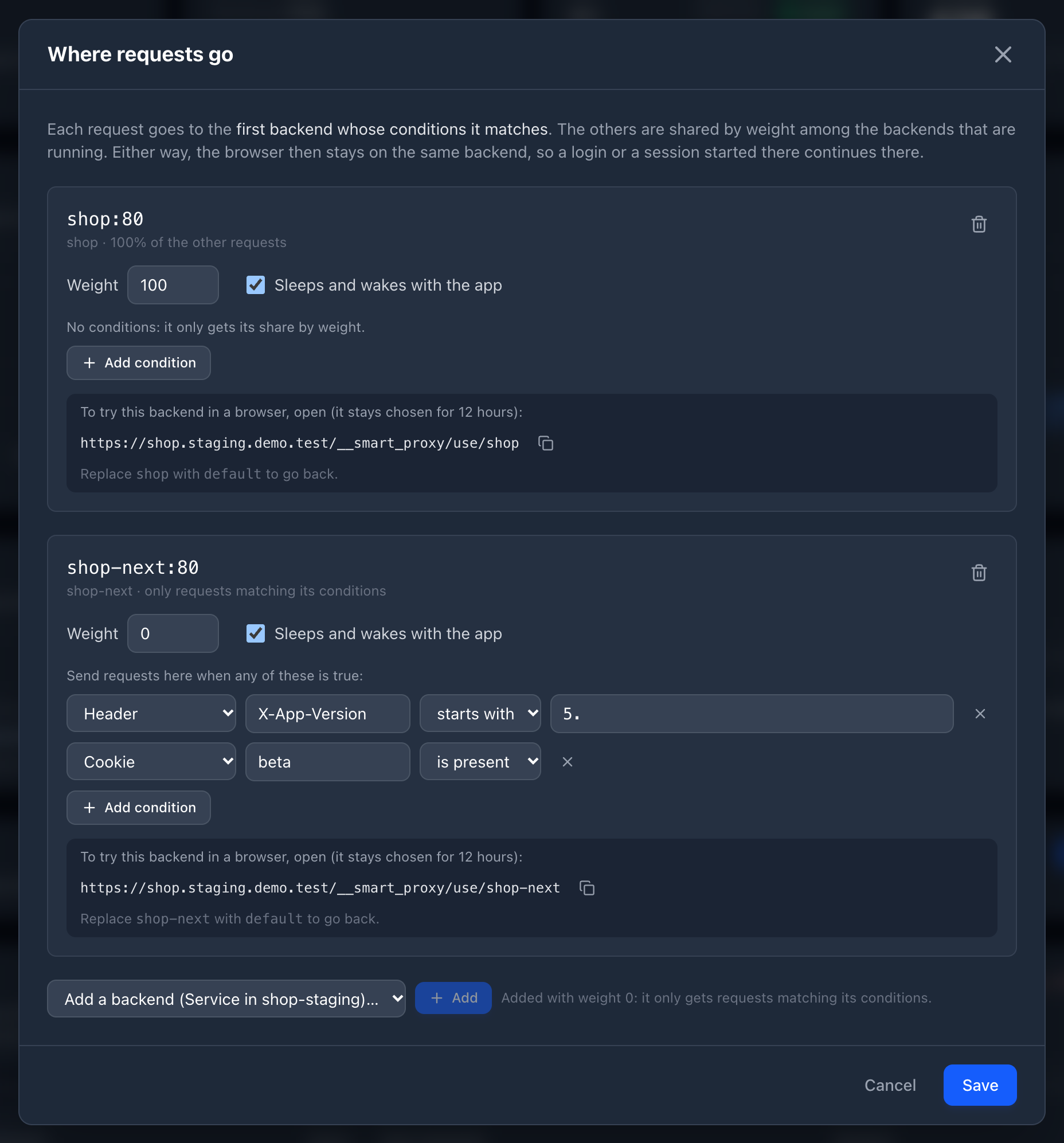
Example: the next version, for the beta of the mobile app
The shop's API has a new version, and you want the beta of the mobile app to use it before everyone else.
- Deploy the new version next to the current one, in the same namespace (e.g.
shop-next). - On the route's page, Add a backend →
shop-next(weight 0: conditions only). - Find what identifies the beta: start recording, open the beta app once, and look at its requests. It sends
X-App-Version: 5.0.0-beta.2; Route like this… on that header adds the condition (change is to starts with5.). - From then on, the beta's requests go to
shop-next. Everyone else stays on the current version.
Colleagues trying it from a browser open https://<host>/__smart_proxy/use/shop-next once, or get a beta cookie: add cookie beta is present as a second condition.
The same works for anything a request carries: a tenant header, an office network (client IP), a new external provider calling back (its Origin), an /api/v2 path.
Pause: just forward, for a while
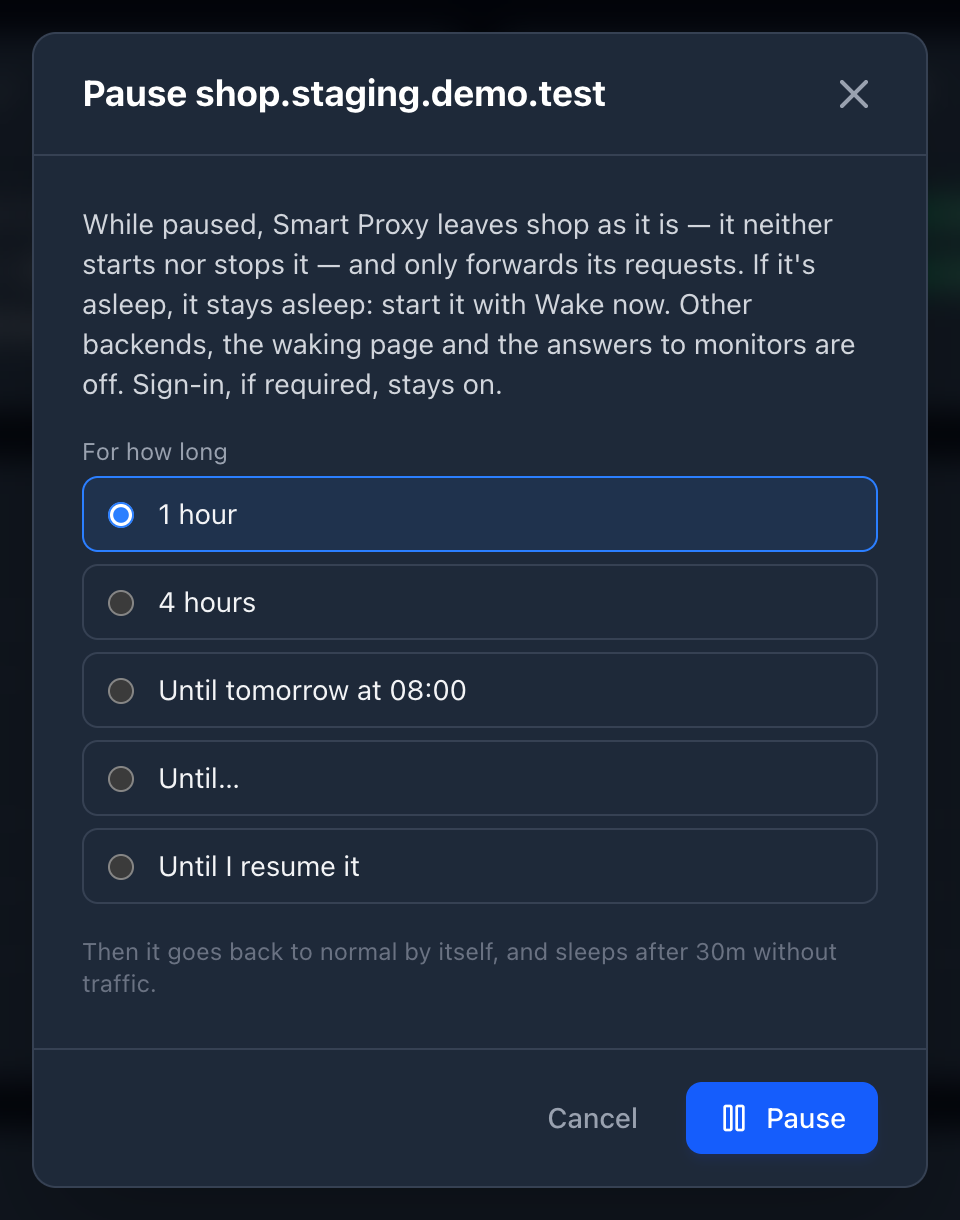
Pause on a route's page (or in the list of routes) turns Smart Proxy into a plain reverse proxy for that route, and leaves its application as it is: for 1 hour, 4 hours, until tomorrow morning, until a date and time, or until you resume it.
- Smart Proxy neither starts nor stops anything while the pause lasts: a running application keeps running, a sleeping one stays asleep — requests then get
503(X-Smart-Proxy: paused) until you start it with Wake now. - Requests go to the route's main backend: no other backend, no condition, no pinned browser.
- Monitors and health checks reach the application like anyone else; nothing is answered for it.
- Sign-in, if the route requires it, stays on: a pause doesn't open an application to everyone.
The list shows the route as Paused until 18:00. When the pause ends the route is back to normal by itself, and its idle timeout starts then: it doesn't go to sleep the moment the pause ends. Resume ends it earlier. Pauses work for routes defined by annotations too.
Ignored requests: monitors and health checks
Requests from uptime monitors and health checks shouldn't keep an application awake, nor wake it. The Ignored requests card on a route's page lists the rules that apply to it, each with how many requests it matched in the last 24 hours and when it last did — a rule that never matches is probably wrong, one that matches too much probably is too:
- Its own rules, one per line, to add, change or remove. A rule has one or more conditions, and a request must meet all of them: a path (exact, or a prefix ending with
*), methods (any of those chosen), a user agent (contains, ignoring case), a client IP or CIDR. For example path/api/statusand methods GET, HEAD ignores a status page polling that endpoint, while aPOSTto it still counts. - Its workloads' probe paths (from their Kubernetes probes), when called by something that isn't a browser.
- The global rules: Smart Proxy's Helm values (
ignore.*) and its list of known monitors.
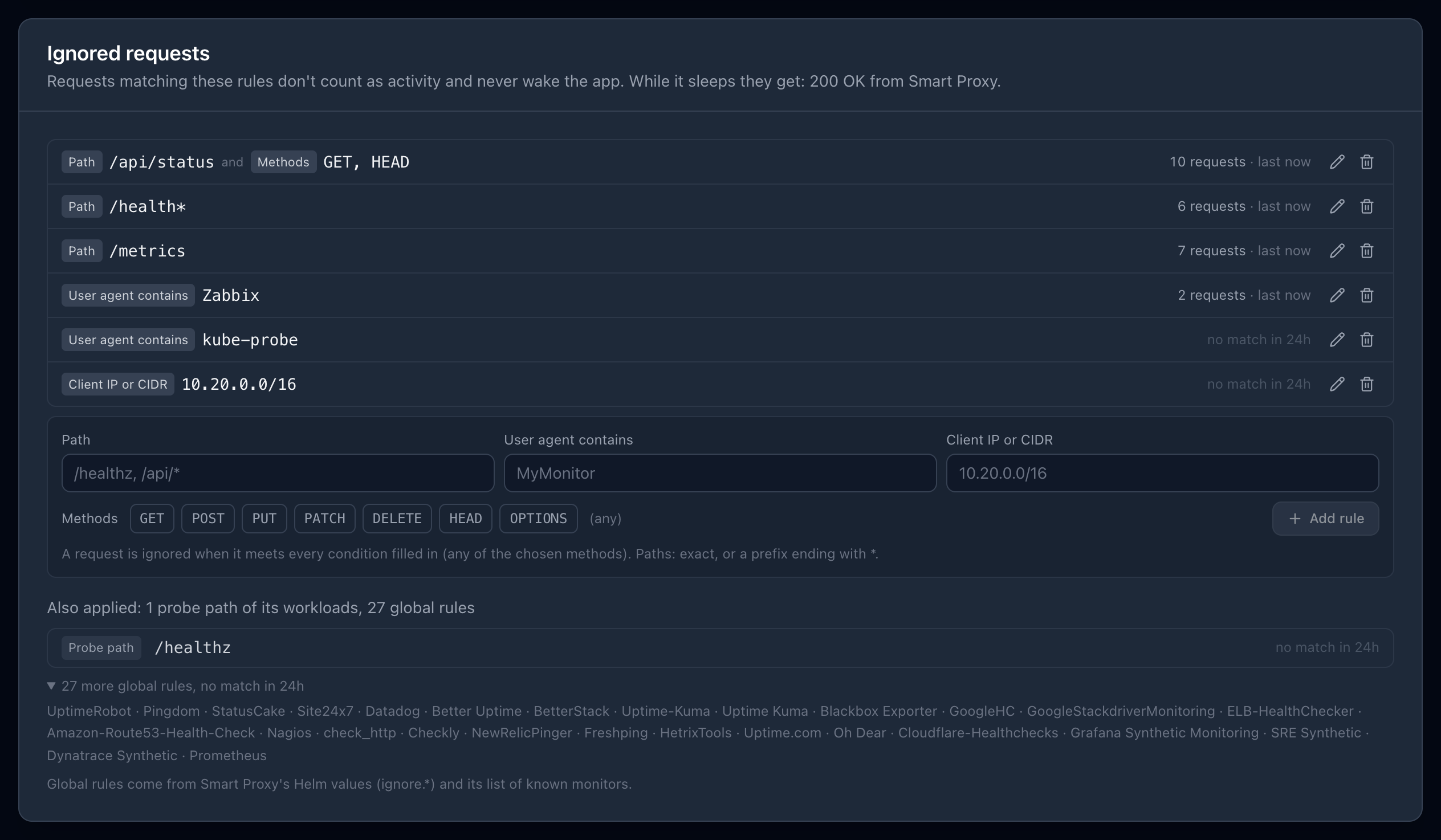
Rules are also added from Who keeps it awake (Ignore) and from a recorded request (Don't count as activity), for the cases nothing detects by itself. While the application sleeps, matching requests get 200 from Smart Proxy, 503, or wake it (the route's settings).
Blocked hours: no wake-ups at night or on weekends
A request to a valid address wakes a sleeping application, at any hour. Blocked hours prevent that when nobody should need it: during them, requests don't start the application (they get 503 Service Unavailable, with Retry-After saying when it can be started again), and when they start the application is put to sleep right away, without waiting for its idle timeout. An application already running (started by hand, say) keeps serving until it's idle.
They are set in three places, the most specific winning:
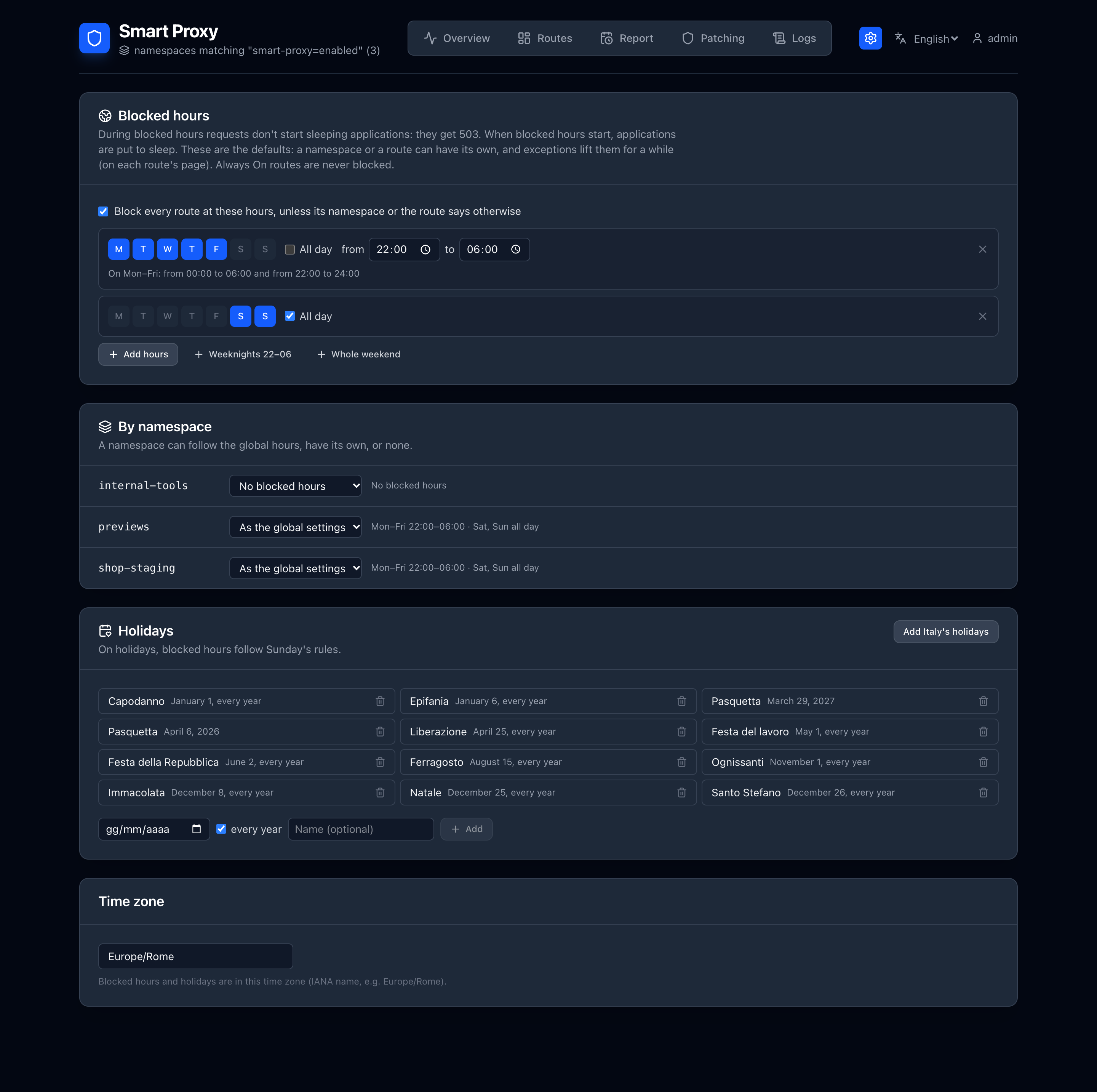
- Settings (the gear in the header) → Blocked hours: for every route (off until you turn it on).
- Settings → By namespace: a namespace follows the global hours, has its own, or none.
- The route's page → Blocked hours: the same three choices, for one route.
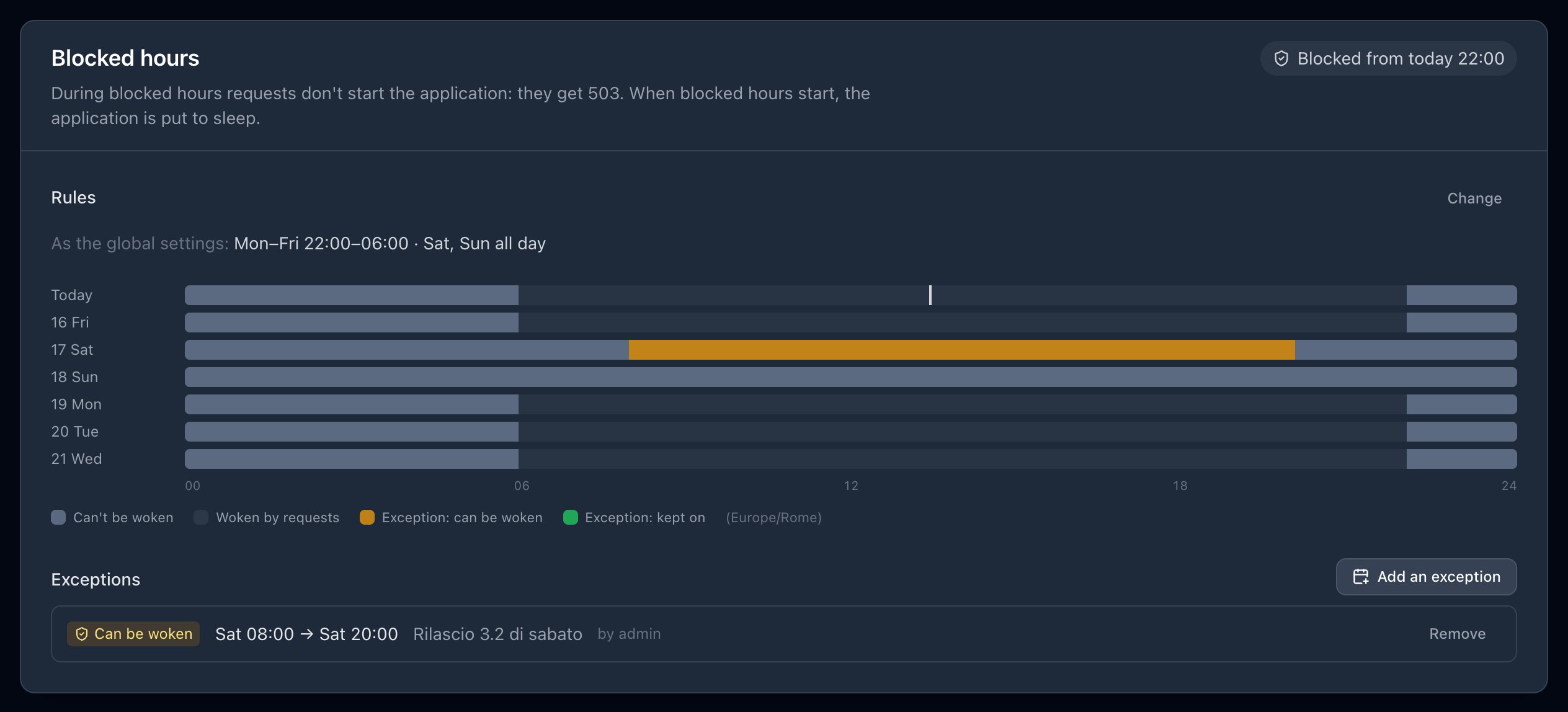
Hours are days of the week plus a time range, or the whole day. A range ending earlier than it starts is the night hours of those days: Mon–Fri 22:00–06:00 blocks each weekday from 00:00 to 06:00 and from 22:00 to 24:00 — Monday morning included. Add Sat–Sun all day for the weekend. The route's page shows the week ahead, hour by hour.
What browsers get. With each set of hours, choose what someone opening the application in a browser gets during them: the 503, or a page saying it's off outside its hours, with a Start it now button and an optional message (who to call, say). The button starts it as if it were outside blocked hours: it stays on while it's used and sleeps after its idle timeout. The browser that pressed it then gets the waking page, which follows the start and shows a workload that couldn't be started. Anyone reaching the page can use it — the point is to stop accidental wake-ups (bots, monitors, links opened by mistake), not people who need the application; API calls, monitors and scripts still get 503. The page itself is answered with status 200, like the waking page — corporate proxies and CDNs replace the body of 5xx answers with their own error page, which would hide the button — and carries X-Smart-Proxy: blocked. Starts are logged with who (on protected routes) and where from, show in the route's recorded requests and count in smart_proxy_started_while_blocked_total.
Holidays (Settings → Holidays; Add Italy's holidays fills in the national ones) follow Sunday's rules. Hours and holidays are in the settings' time zone, Europe/Rome by default.
Exceptions lift a route's blocked hours for a while, from its page (Add an exception), for up to 31 days:
- Can be woken: requests start the application as usual (a release on Saturday, someone on call);
- Kept on: it is started when the exception begins and stays on until it ends, even without traffic (a demo in the evening).
When an exception ends inside blocked hours, the application is put to sleep. End now ends one early; who added it, when and why are kept. Wake now from the dashboard starts an application during blocked hours too, after a confirmation. A pause also lifts them, and Always On routes are never blocked; a schedule keeping a route awake doesn't apply during blocked hours.
The requests turned away show in the route's recorded requests (Not woken: blocked hours) and in the smart_proxy_wakes_blocked_total metric. The settings are kept in the ConfigMap <release>-settings.
Export, import, restore
- Export (above the list of routes, or on a route's page) downloads routes as a JSON file: all of them, or those you tick. Every setting is in it — dependencies, idle timeout, schedule, ignore rules, backends, access settings — but not the people and access tokens of protected routes. Routes defined by annotations are left out: they live in Git already.
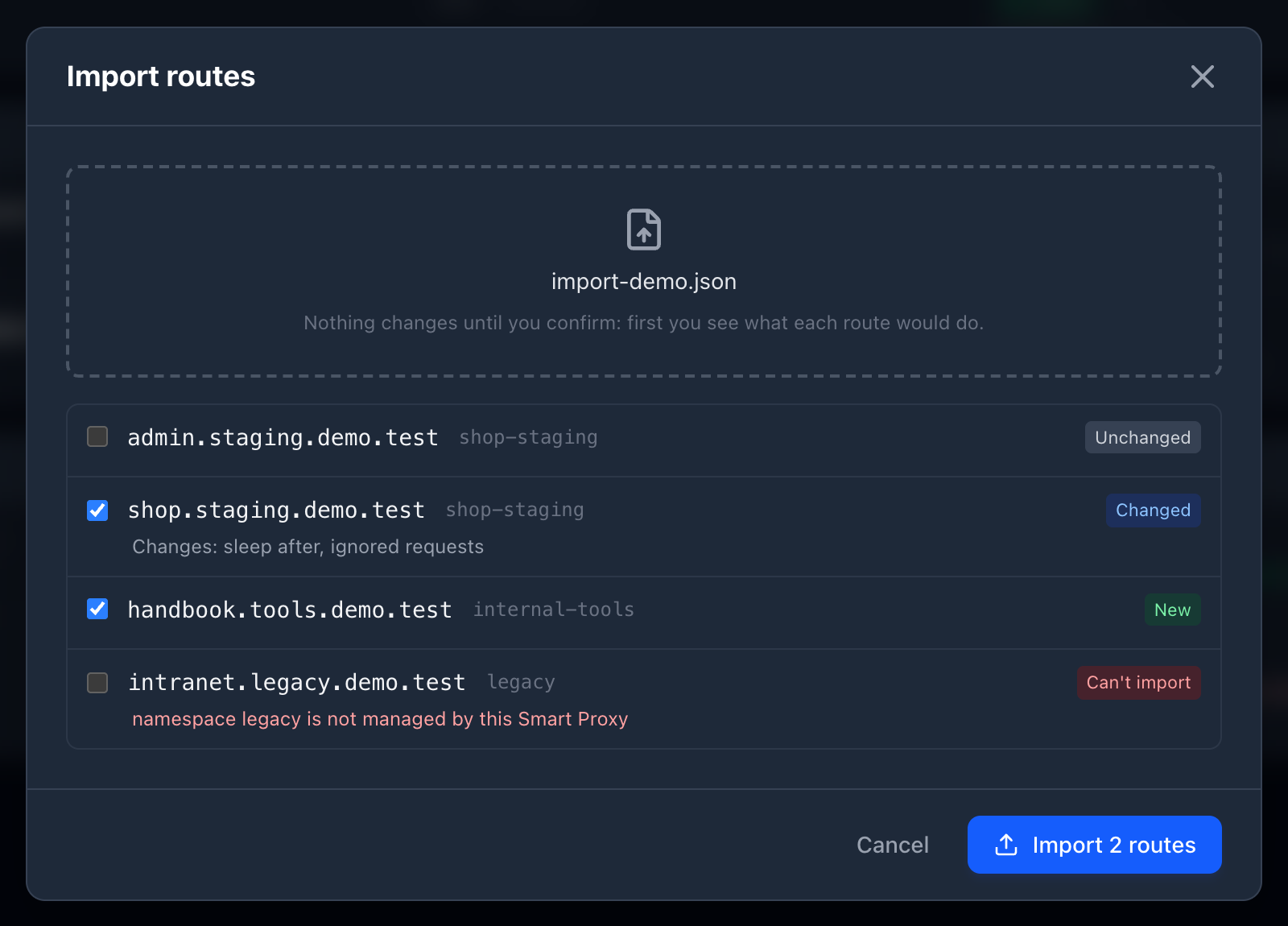
-
Import reads such a file and first shows what each route would do: new, changed (and which settings), unchanged, or can't import (its namespace isn't managed, another route serves the same host and path, invalid settings). Nothing changes until you confirm; imported routes patch their Ingresses/Routes as when they are saved. Protected routes come without people or tokens: until you add some, nobody gets in.
-
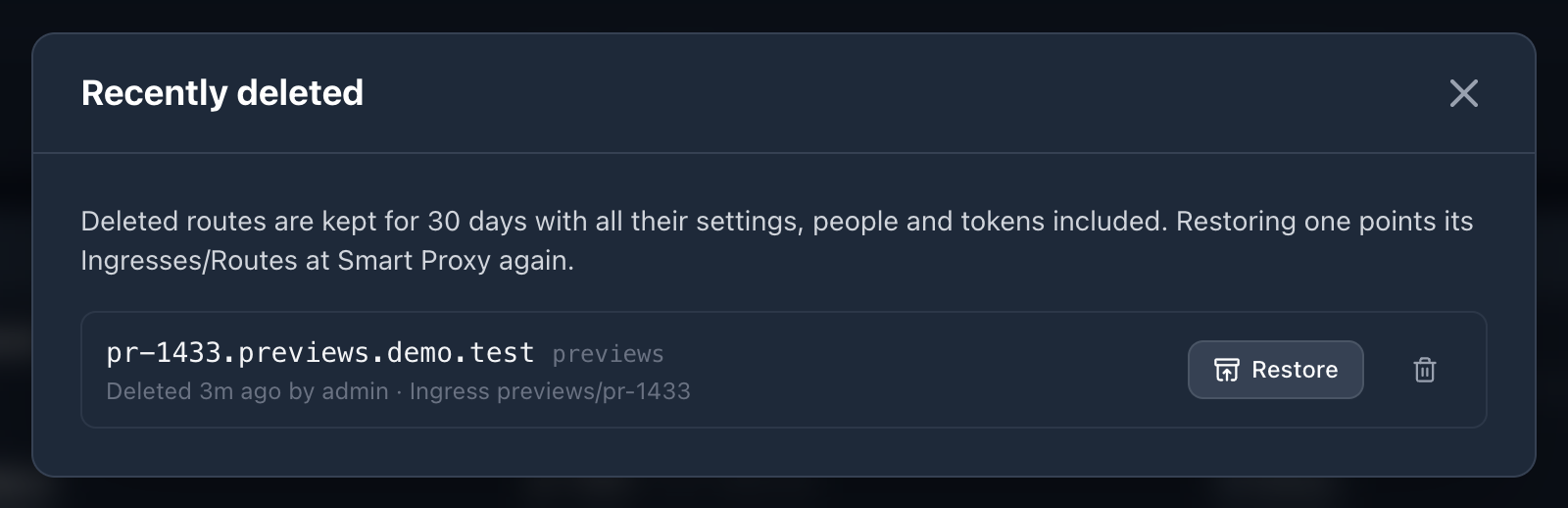
Recently deleted keeps deleted routes for 30 days (the latest 50), with all their settings, people and tokens included. Restore puts a route back and points its Ingresses/Routes at Smart Proxy again. They are kept in the ConfigMap
<release>-deleted-routes, removed with Smart Proxy.
Uptime: the last 30 days
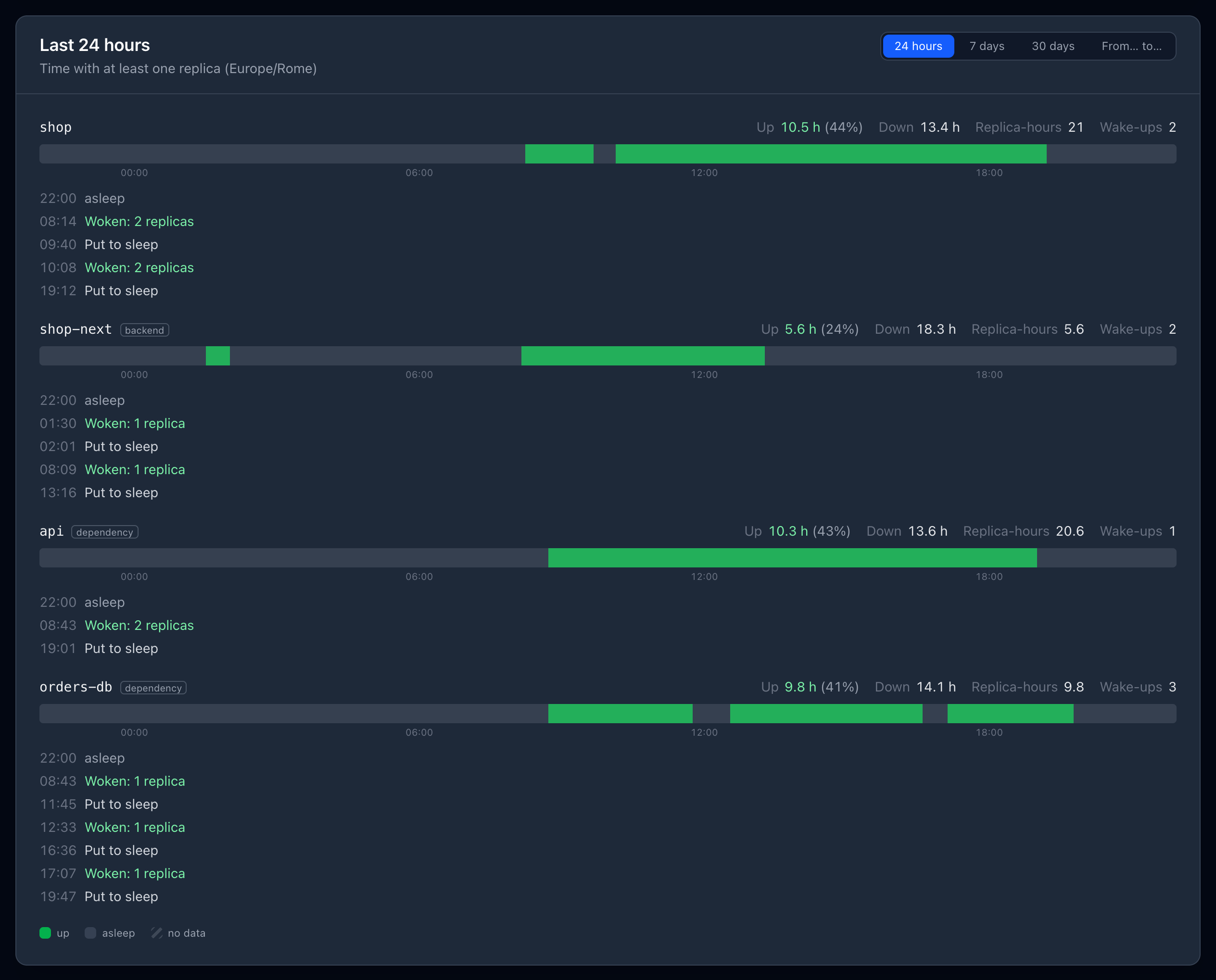
Smart Proxy records, every minute, whether each workload it manages (the routes' workloads, their backends and dependencies) has at least one replica, and the minute its replicas change. For any period of the last 30 days — the last 24 hours, 7 or 30 days, or from… to… down to the hour — a route's page shows its workloads:
- hours up and down, the share of time up, replica-hours (a replica running for an hour counts one, three replicas for an hour count three) and how many times each was woken;
- for periods up to 3 days, a timeline to the minute and the list of changes: woken at 03:12 (2 replicas), put to sleep at 03:41. Whether an application stayed asleep all night is the absence of changes between the evening and the morning;
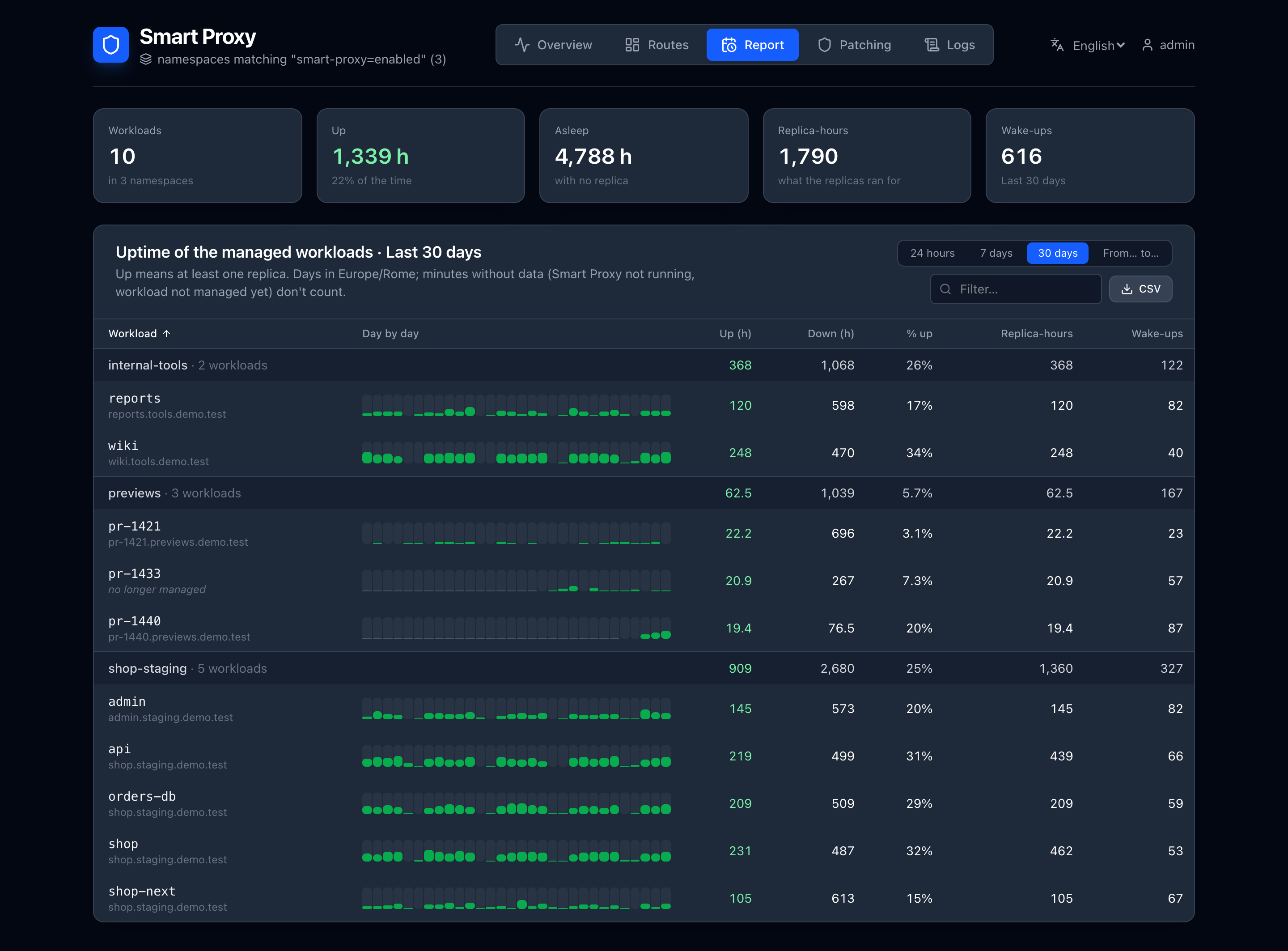
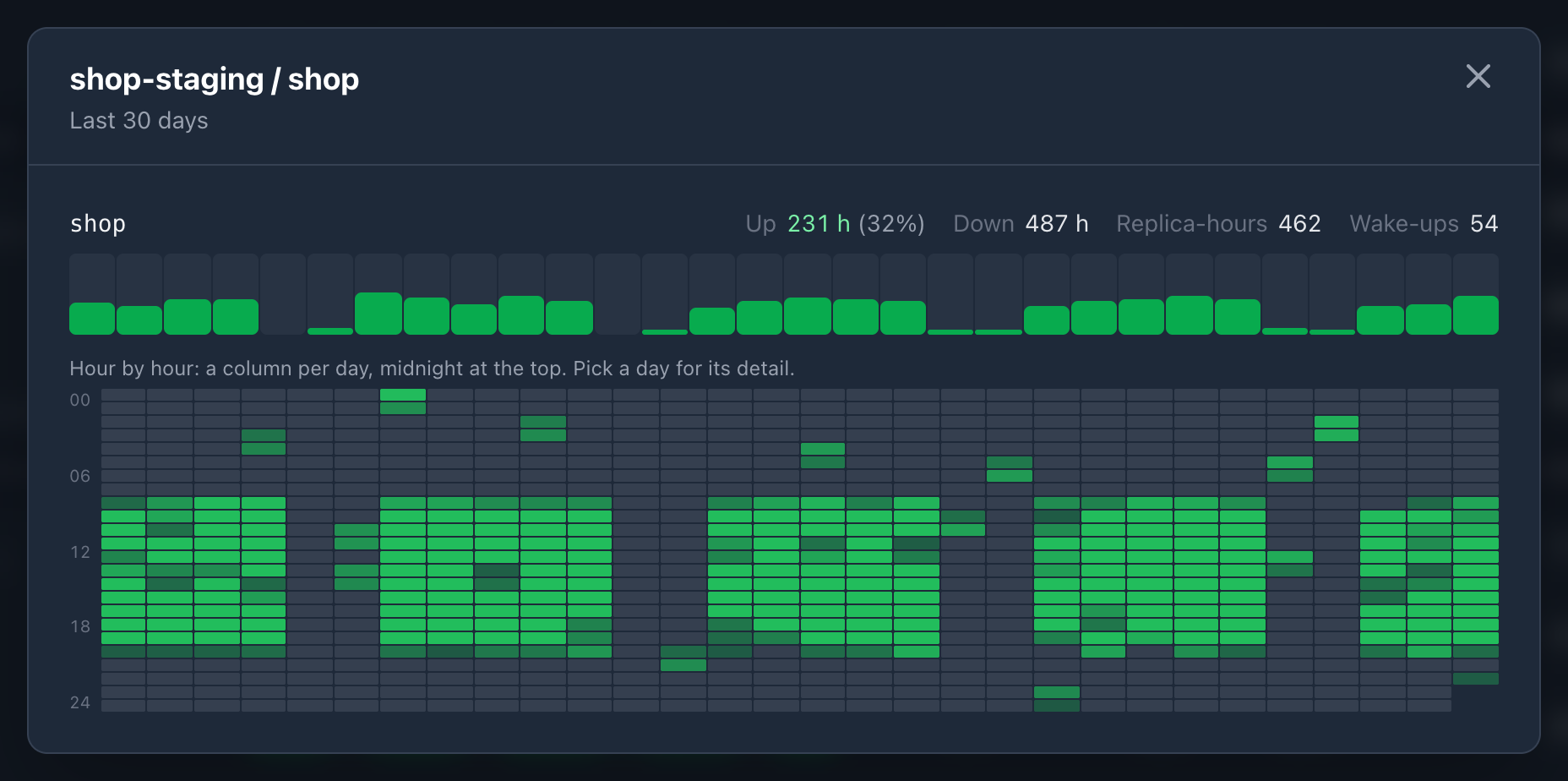
- for longer periods, a bar per day and a map of every hour (a column per day, midnight at the top): a night asleep is a dark band, a wake-up at 3 a bright cell. Picking a day opens its timeline and changes.
The Report tab gathers every managed workload by namespace for the same periods, with totals, sorting and a filter; picking a workload opens its detail (map of the hours, changes). CSV downloads it, with the hours up of each day — or, for periods up to 3 days, the minutes up of each hour.
- Days and hours are in the browser's time zone.
- Minutes without data don't count, neither up nor down: before Smart Proxy was installed or upgraded, while it wasn't running, before a workload was managed. They show as hatched; the page says from when the history starts. The times of the changes are recorded from 2.7 on: earlier days show hour by hour.
- A workload no longer managed keeps its history until it is older than 30 days.
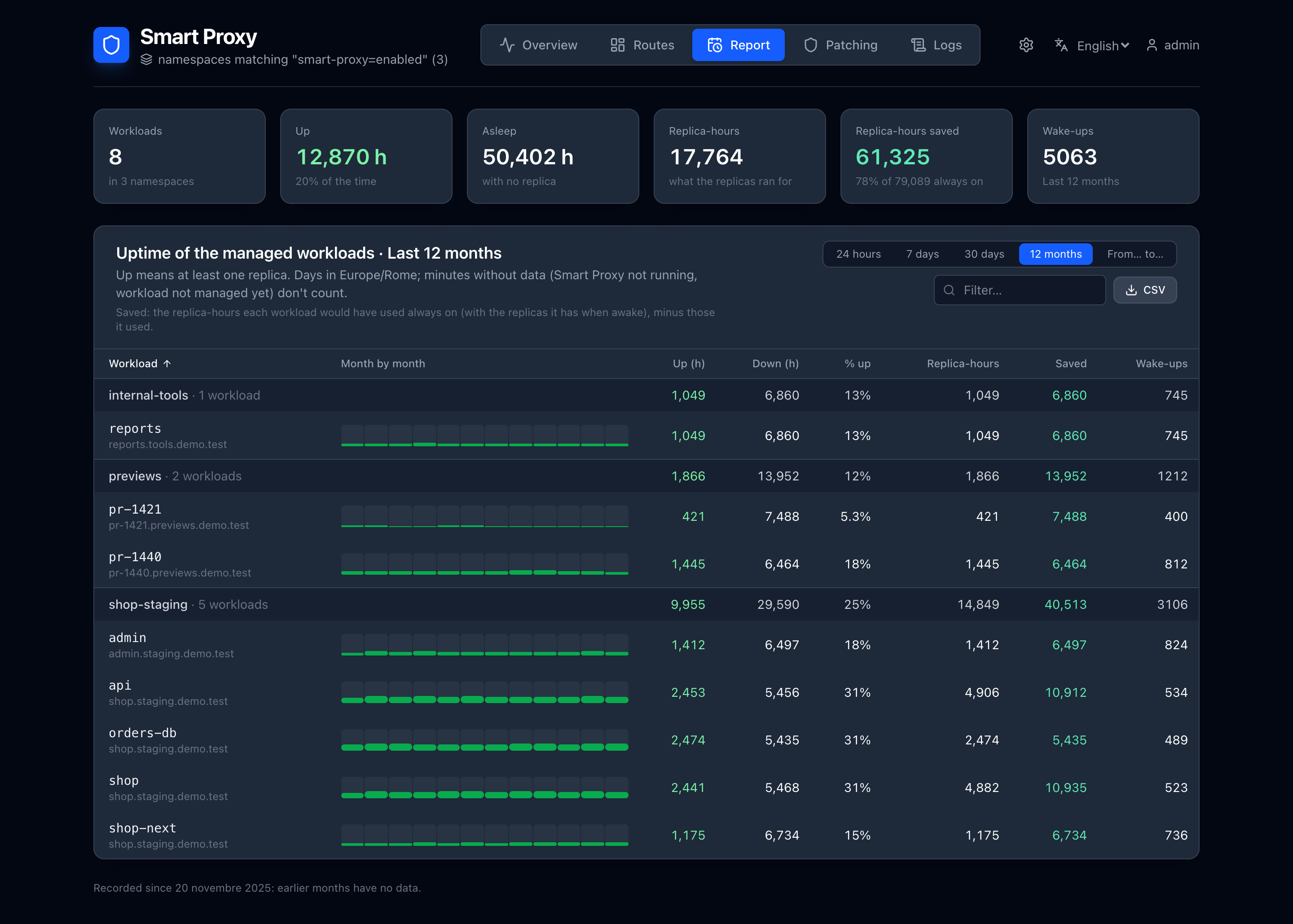
- Last 12 months. The Report tab also covers the last year, month by month (12 months): Smart Proxy keeps a day-by-day summary for 366 days (days in Europe/Rome), besides the hour-by-hour last 30 days. Minutes and changes aren't kept that long.
- Saved replica-hours. Every period shows the replica-hours saved: those each workload would have used always on — with the replicas it has when awake — minus those it used. Hours recorded before 2.8 are estimated from the average replicas while up.
- The history is kept in the ConfigMaps
<release>-uptimeand<release>-uptime-year(compressed, a few kilobytes per workload), written by the leader every 5 minutes and removed with Smart Proxy.GET /api/uptimeanswers it as JSON:days=7orfrom=…&to=…(RFC 3339),tz=Europe/Rome,route=<id>orworkload=<namespace>/<name>,hours=1andchanges=1for the hours and the changes.
Access: require sign-in or a token
Require sign-in on a route's page puts the application behind:
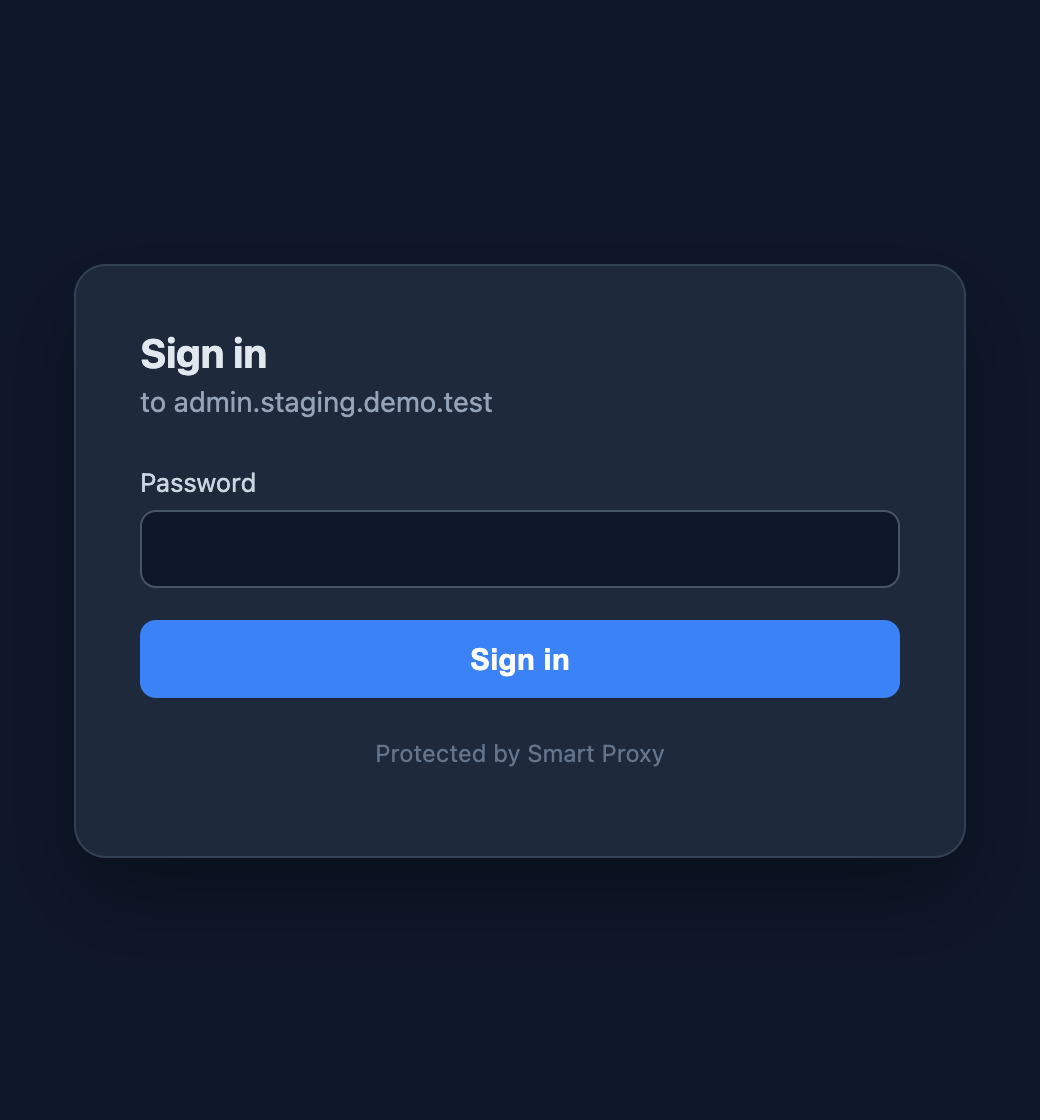
- People, who sign in on a page served by Smart Proxy on the application's own address (
/__smart_proxy/login,/__smart_proxy/logout). With a single person the page only asks for the password: use it as a shared password for a team. A login lasts 12 hours. Removing a person signs them out. - Access tokens, for scripts and other services:
Authorization: Bearer <token>, orX-Api-Key: <token>when the application usesAuthorizationitself. Each token is named after who uses it, shown once, and can be revoked. - Open paths, reachable without signing in: webhooks (
/webhooks/*), callbacks from other services, health checks (/health*).
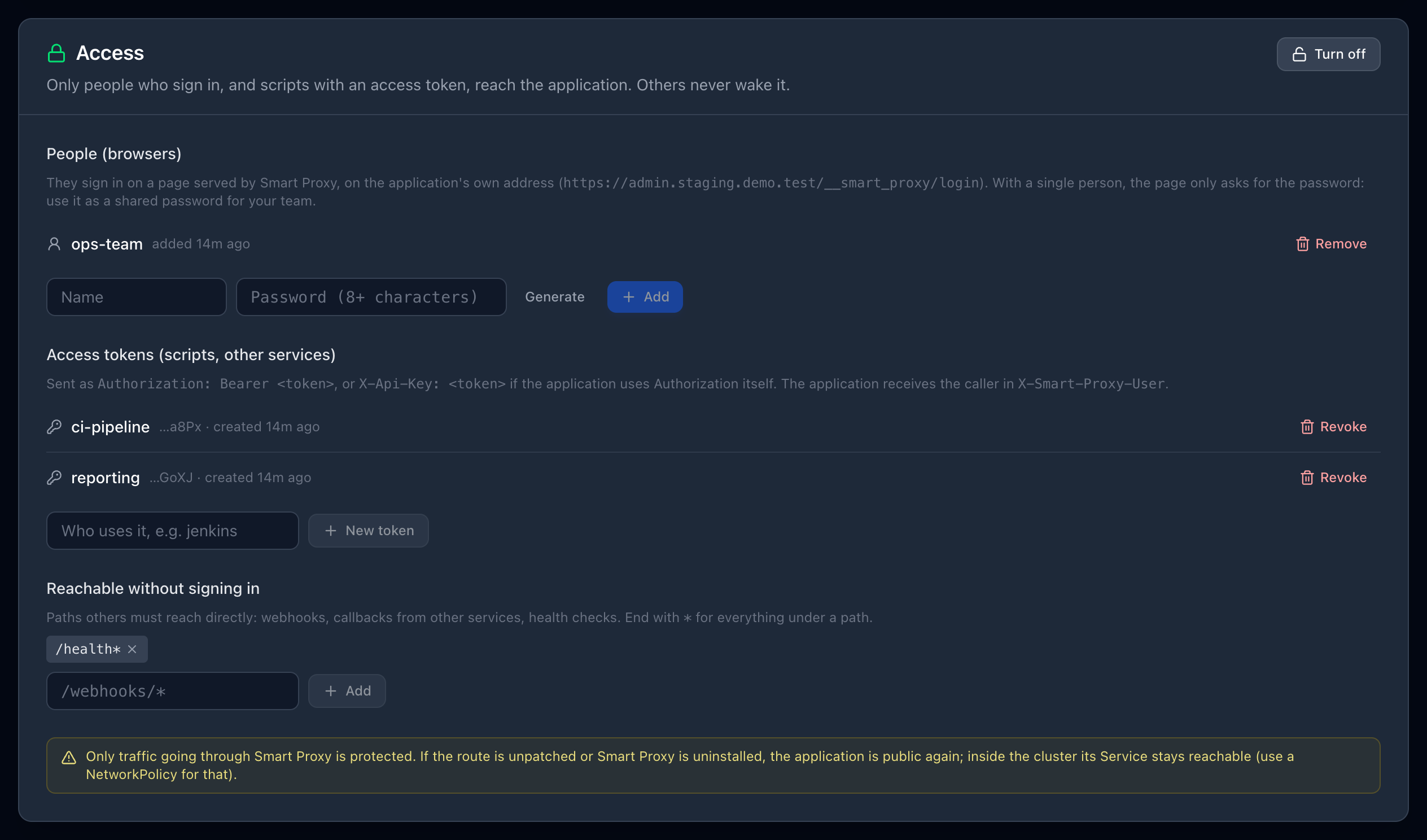
The application receives the caller in the X-Smart-Proxy-User header (a person's name, or token:<name>); Smart Proxy's own credentials and cookie are removed. Requests without credentials never wake the application and don't count as activity.
Passwords (PBKDF2-SHA256) and tokens (SHA-256) are stored hashed in Smart Proxy's own Secret, <release>-state. Failed sign-ins (on the page or with Basic credentials) are limited to 10 per client and 30 per person every 5 minutes. Changing a password signs out everyone who used the old one. Paths are checked the way applications read them (; parameters, .., backslashes), so an open path can't be used to reach a protected one.
What it doesn't protect
Only traffic going through Smart Proxy is checked. If the route is unpatched or Smart Proxy is uninstalled, the application is reachable without signing in again. Inside the cluster, its Service stays reachable directly: use a NetworkPolicy if that matters.
Routes defined by annotations (GitOps) can't be protected or given backends from the dashboard yet.